
What is PGP Encryption?
PGP encryption is a method used to secure email communications by encrypting the content of the message so that only the intended recipient can decrypt and read it. PGP works on the principle of public-key cryptography, where each user has a pair of keys: a public key, which is shared with others, and a private key, which is kept secret. The public key is used to encrypt messages, while the private key is used to decrypt them.
Kleopatra is a user-friendly interface for managing PGP keys and encrypting/decrypting messages. Kleopatra provides an easy-to-use graphical interface that simplifies the process of generating key pairs, importing/exporting keys, and encrypting/decrypting messages.
Getting started with kleopatra
1.Install Kleopatra: First, you'll need to download and install Kleopatra on your computer. It can be downloaded from the GnuPG website
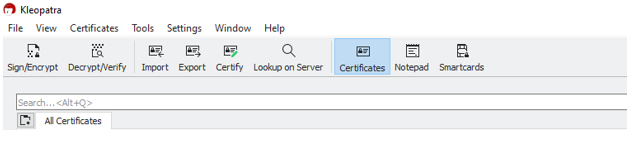
After finishing the setup, run Kleopatra which will allow us to generate our key pairs and also manage them in a nice graphical user interface.
2. Now, to create a new key pair. Go to
File -> New Key Pair
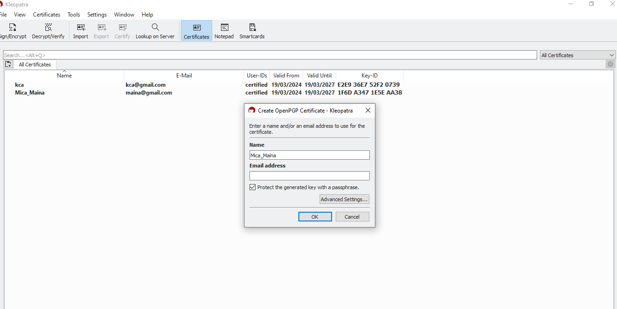
Fill in the email and/or email address that will be used for the certificate. Do check the text box that says Protect the generated key with a passphrase, for an added layer of security.
You may click on Advanced Settings to see some extra configuration options (you may notice RSA),3072 bits is the encryption algorithm strength. You can also see Signing is enabled here, just to verify that the message that has been sent has not been tampered with. Valid-until is used to provide validity to the key pair (by default, it is 1 year).
3. Now, click OK. It will ask for the passphrase you want to use. Make sure it is secure.

4. After generating the key pair, the next step is to export my public key to others to enable them to encrypt messages to you securely. Click on export and choose the directory you want to save it in.
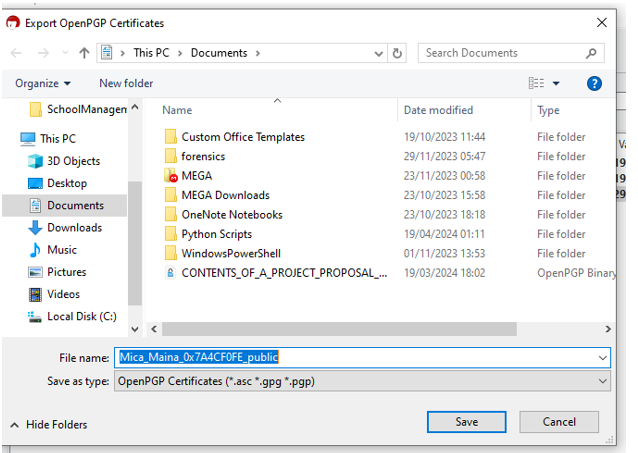
It's up to you how you want to share the key with your contacts or recipients. This can be achieved through email, USB sharing, etc.
You can also import other people's keys by clicking on import from Kleopatra.
In simple terms, let’s use Alice and Bob example.

Here, if Alice wants to send a document to Bob, Bob has to first generate his key pair (public key and private key). Bob then sends his public key to Alice. Alice will use Bob’s public key to encrypt her message and send it to Bob. Since Bob is the only person with the private key, he’ll use the private key to encrypt Alice’s message. Note: Bob’s public key can be shared to numerous people but the private key is only accessible to Bob.
If Bob wants to send a message to Alice, it’s the reciprocal where Bob uses Alice’s public key and Alice decrypts it using her private key.
Add-ons
Encryption alone does not guarantee the authenticity of the sender or protect against tampering. This is where digital signatures come into play. Digital signatures provide a means of verifying the authenticity and integrity of a message. They are created using the sender's private key and can be verified using their public key. In our instance, if Alice is the sender. Alice will use her private key to encrypt the message and Bob will verify it using Alice's public key.
By attaching a digital signature to an email, the sender asserts ownership of the message and guards against any alterations made in transit. This feature is crucial for establishing non-repudiation, as it prevents the sender from denying their involvement in the communication.


Leave a Reply