

Phishing is a cybercrime tactic where scammers impersonate legitimate entities, such as banks, government agencies, or reputable companies, to trick individuals into disclosing personal information, such as usernames, passwords, or financial data. These scams often utilize email as the primary means of communication.
Recognizing Phishing Emails
1. Suspicious Links and Attachments:
Phishing emails may contain links or attachments that, when clicked or downloaded, lead to malicious websites or install malware on your device. Hover over links to reveal their true destination and avoid opening attachments from unknown senders.2. Urgency and Fear Tactics:
Phishing emails often create a sense of urgency, urging recipients to take immediate action or face consequences. Be cautious of messages that threaten account suspension, legal action, or financial penalties.3.Spoofed Sender Addresses:
Scammers frequently impersonate trusted entities by spoofing email addresses. While the sender's name may appear legitimate, closely examine the email address itself for any irregularities or misspellings.4.Poor Grammar and Spelling:
Many phishing emails originate from non-native English speakers or automated systems, resulting in noticeable grammar and spelling errors. Exercise caution when encountering poorly written messages, as they may indicate fraudulent intent.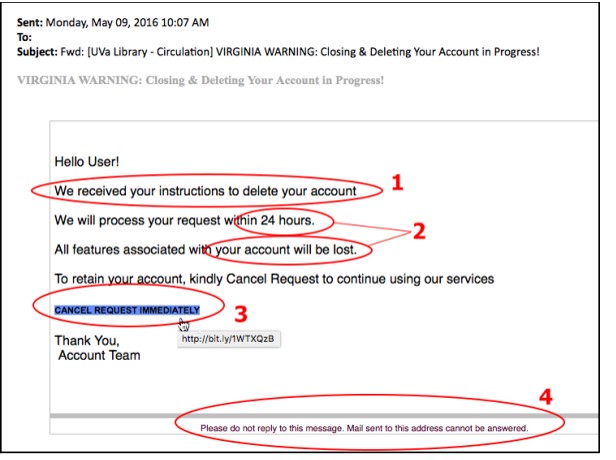
In the above example, you can see there is an urgency for the user to reset his/her account by clicking the link provided. It is always good to hover over the provided link. This enables us to detect whether the website uses http:// or https://
Http shows that the website is not secure or encrypted which means the data collected is not safe.
With that example, is pretty obvious to note that this is a phishing email. To make it look more convincing, a number of things can be done. With this example, you can note a big difference.
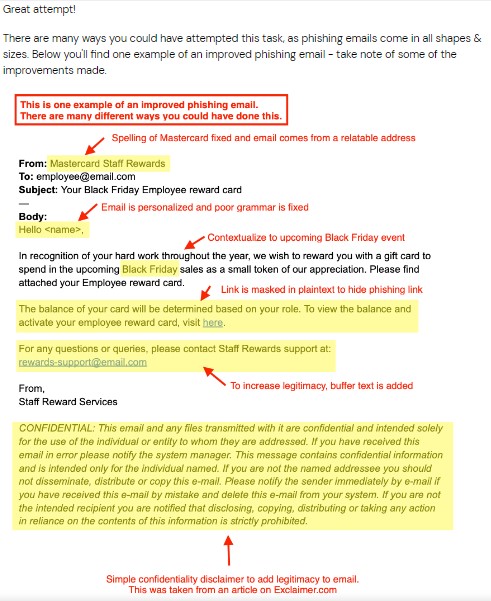
Comparing the 2 images, you can see some improvements such as: Improved grammar, confidentiality disclaimer added to make the user more comfortable. Relatable email address is also used.


Leave a Reply